
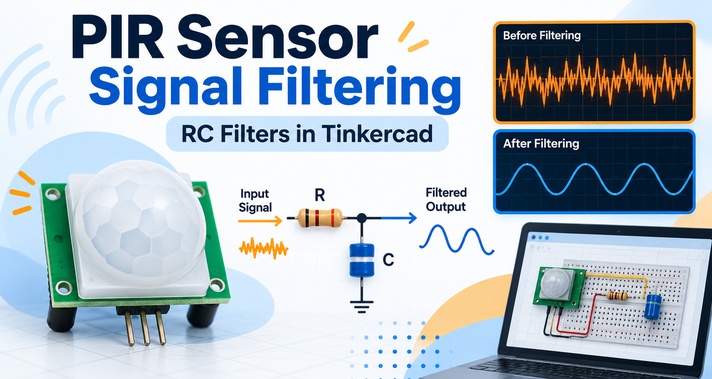
Passive Infrared (PIR) sensors are widely used in motion-activated lights, security systems, automatic doors and occupancy detection systems. A PIR sensor responds to changes in infrared radiation within its field of view. In a practical circuit, however, the useful motion signal can become mixed with slow thermal changes and faster electrical interference. If these unwanted signals are not filtered properly, a motion detection system may become unstable or produce false triggers.
In this guide, we will design a simple PIR motion sensor signal filtering circuit in Tinkercad using RC filters. The objective is to preserve motion-related frequencies from approximately 0.1 Hz to 5 Hz while reducing signals outside this useful range. Instead of concentrating on complicated calculations, we will focus mainly on circuit construction, Tinkercad simulation and waveform analysis.
Why Does a PIR Motion Sensor Need Signal Filtering?
PIR sensors detect small changes in thermal radiation. Because these changes can be relatively weak, unwanted environmental or electrical signals may interfere with motion detection.
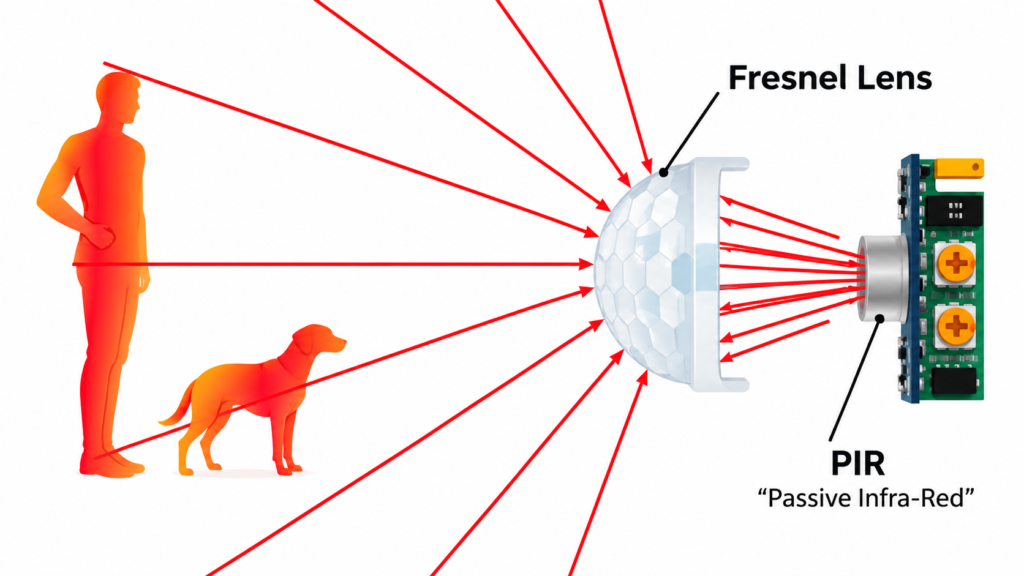
Slow disturbances may be caused by:
- Sunlight gradually moving across a room
- Slow changes in room temperature
- Heating and cooling systems
Higher-frequency interference may come from:
- Motors and fans
- Switching power supplies
- USB power banks
- LED drivers
- Nearby digital electronics
A useful PIR filtering system therefore needs to remove noise on both sides of the desired motion-frequency range.
A simple approach is to use:
- A high-pass filter near 0.1 Hz to reduce very slow thermal changes.
- A low-pass filter near 5 Hz to reduce higher-frequency electrical noise.
When these two filtering stages are combined, they create a basic band-pass response suitable for PIR motion signals.
Filter Strategy for PIR Motion Detection
Low-Pass Filter for Noise Above 5 Hz
The first stage is a simple first-order RC low-pass filter.
Its purpose is to allow lower-frequency motion information to reach the output while reducing frequencies greater than approximately 5 Hz.
In a passive RC low-pass filter:
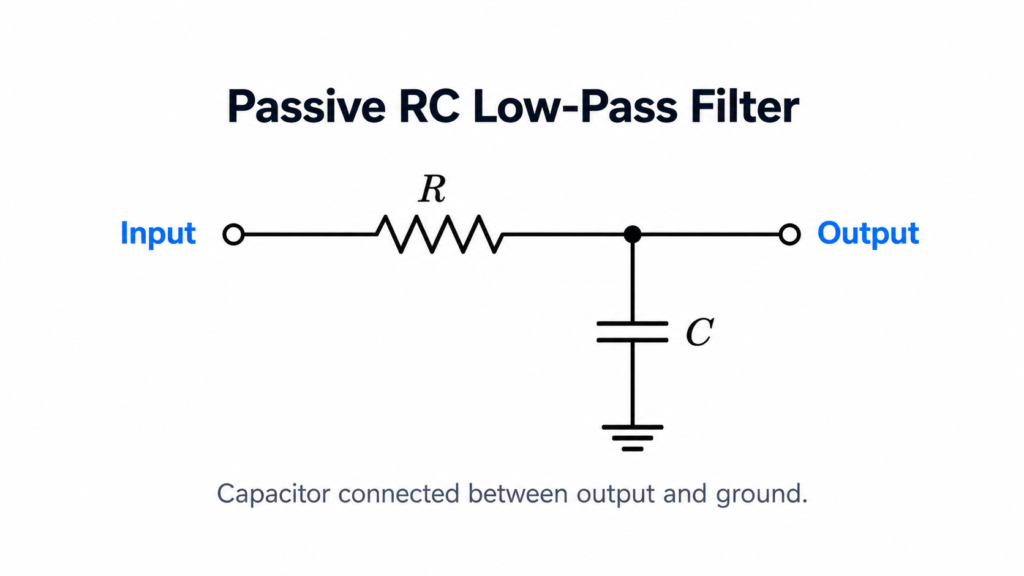
For this simulation, we can use:
- Resistor: 250 kΩ
- Capacitor: approximately 0.127 µF
- Cutoff frequency: approximately 5 Hz
A rounded capacitor value of around 0.13 µF can also be used for a straightforward educational simulation.
High-Pass Filter for Noise Below 0.1 Hz
The second stage is an RC high-pass filter.
Its purpose is to reduce extremely slow changes caused by gradual temperature variation or sunlight while allowing normal motion-related variations to pass.
The circuit arrangement is reversed compared with the low-pass filter:
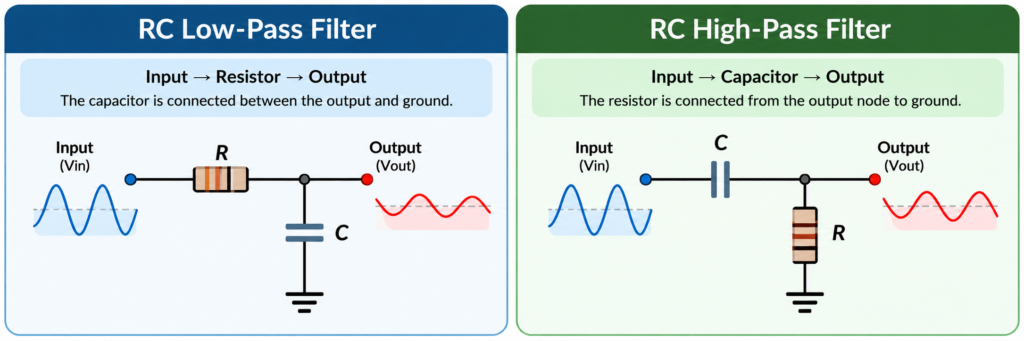
For an educational example, an RC combination such as 1 MΩ and approximately 1.6 µF provides a cutoff close to 0.1 Hz. The exact values are less important here than understanding how the filter behaves.
Components Required in Tinkercad
Before starting the Tinkercad PIR filter simulation, prepare the following components:
- Function Generator
- Resistors
- Capacitors
- Oscilloscope or waveform measurement instruments
- Connecting wires
- Optional breadboard
Tinkercad Circuits allows electronic circuits and breadboard-based designs to be created and simulated online, making it useful for experimenting with filter behavior before assembling physical hardware.
How to Build the 5 Hz Low-Pass Filter in Tinkercad
Step 1: Create a New Tinkercad Circuit
Open Tinkercad and select Circuits.
Create a new circuit and rename it something descriptive, such as:
PIR Signal Filtering
If the simulation is being prepared for an academic project, you can also add a text label containing your name and student ID.
Step 2: Add the Function Generator
Place a Function Generator inside the workspace.
For this experiment, use a sine wave, since it makes changes in waveform amplitude easy to observe.
Configure the generator with:
- Amplitude: 5 V
- DC Offset: 0 V
The frequency will be changed later for different noise tests.
Step 3: Build the Low-Pass RC Filter
Add:
- One 250 kΩ resistor
- One approximately 0.127 µF capacitor
Connect the function generator output to the resistor.
Connect the other side of the resistor to a new node called Vout.
Next, connect the capacitor between Vout and ground.
The basic signal path becomes:
Function Generator → 250 kΩ Resistor → Vout
And:
Vout → Capacitor → Ground
The voltage at Vout is the filtered signal.
Step 4: Connect the Oscilloscope
Now monitor both the input and output waveforms.
Connect one measurement point to the function-generator output and another to Vout.
Make sure both measurements use the same common ground reference.
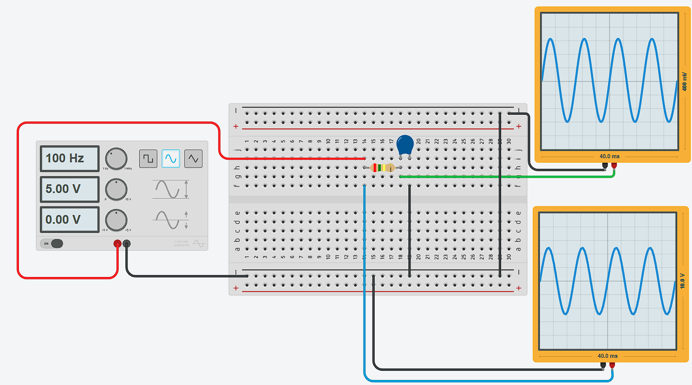
When examining the simulation, pay particular attention to the difference between the input and output amplitudes.
Testing the Filter at 100 Hz
Set the Function Generator frequency to:
100 Hz
For easier waveform viewing, use approximately:
4 ms per division
Start the simulation.
Because 100 Hz is considerably higher than the 5 Hz cutoff frequency, the output waveform should have a much smaller amplitude than the original input waveform. This shows that the RC low-pass filter is rejecting a significant portion of the higher-frequency signal.
For project documentation, we capture a screenshot containing:
- Complete RC circuit
- Function generator
- Input waveform
- Output waveform
- Component values
Testing the Filter at 1000 Hz
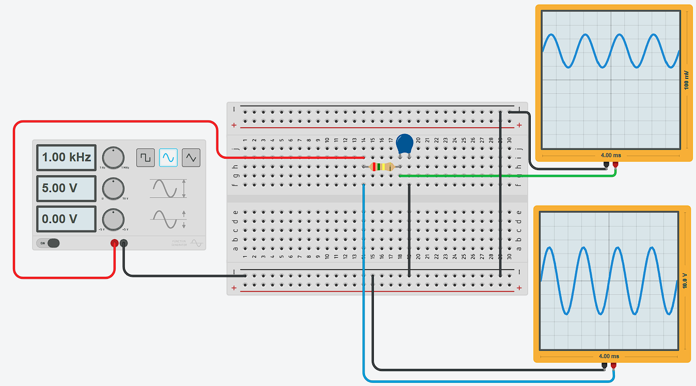
Next, change the Function Generator frequency to:
1000 Hz or 1 kHz
Set the oscilloscope time scale to approximately:
400 µs per division
Run the simulation again.
You should notice that the output amplitude becomes even smaller than it was during the 100 Hz test.
This demonstrates one of the most important properties of a low-pass RC filter: as an unwanted signal moves farther above the cutoff frequency, its amplitude at the output becomes increasingly reduced.
Therefore:
100 Hz → attenuated
1000 Hz → even more strongly attenuated
The simulation provides a simple visual demonstration without requiring extensive mathematical analysis.
Building the 0.1 Hz High-Pass Filter in Tinkercad
The next stage deals with extremely slow thermal changes.
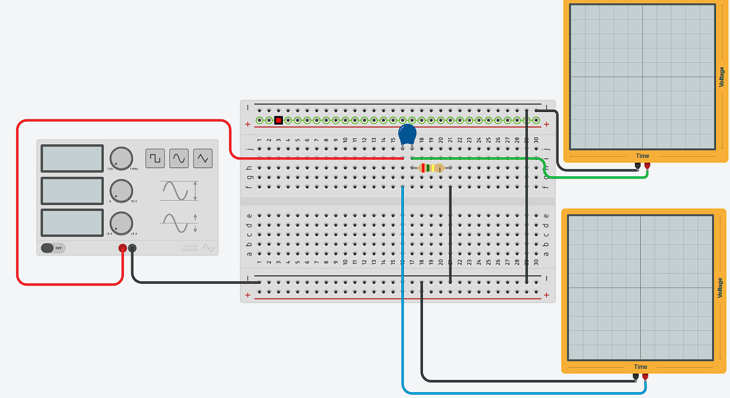
Create another RC network using the following arrangement:
Input → Capacitor → Vout
Then connect:
Vout → Resistor → Ground
The output is measured across the resistor.
Select component values that provide a cutoff close to 0.1 Hz.
The purpose of this stage is straightforward: gradual temperature or sunlight changes should be reduced, while faster changes associated with motion should continue toward the output.
When simulating very low frequencies, remember that the waveform takes considerably longer to complete than a 100 Hz or 1 kHz signal.
Combining the Filters into a PIR Band-Pass Filter
The low-pass and high-pass circuits can now be combined.
A simple signal-flow diagram is:
PIR Sensor / Test Signal → 0.1 Hz High-Pass Filter → 5 Hz Low-Pass Filter → Filtered Motion Signal
The high-pass stage removes slow thermal drift.
The low-pass stage removes fast electrical interference.
Together, they preserve approximately the 0.1 Hz to 5 Hz PIR motion detection range.
For a basic Tinkercad demonstration, the two passive RC sections can be connected directly. In a more accurate physical circuit, adding a buffer or active filter stage between them can be useful because one passive filter can electrically load the other and slightly change its response.
What Should You Observe in the Waveforms?
The function generator provides the original input waveform, while the RC network produces the filtered output.
For the low-pass filter:
- At 100 Hz, the output should be noticeably reduced.
- At 1000 Hz, the output should be reduced even further.
For the high-pass filter, very slow or nearly constant changes should be reduced, while frequencies above the lower cutoff should pass more effectively.
Remember that a basic RC filter does not instantly remove everything above or below its cutoff frequency. Its response changes gradually around the cutoff.
Common Noise Sources Affecting PIR Sensors
Real PIR motion detection circuits can experience interference from several nearby devices.
A motor or fan may introduce mechanical vibration and electrical harmonics. Switching power supplies and USB power banks can generate switching interference, while LED lighting circuits may introduce additional electrical noise.
Nearby digital devices can also couple unwanted signals into sensitive sensor wiring.
Filtering alone may not solve every problem. A reliable PIR circuit should also use:
- Short signal wiring
- Stable power supply
- Proper grounding
- Good component placement
- Separation from noisy switching electronics
These practices help improve the quality of the signal before it reaches the detection circuitry.
Common Tinkercad Simulation Mistakes
Incorrect Low-Pass Filter Connection
In the low-pass circuit, the resistor should be placed in series with the input, while the capacitor connects between Vout and ground.
Connecting them incorrectly may produce a different filter response.
Incorrect Ground Reference
The function generator and oscilloscope should use the same electrical reference.
Incorrect grounding can result in confusing or misleading waveforms.
Using the Same Oscilloscope Time Scale
A 100 Hz signal and a 1000 Hz signal should be viewed using different time settings.
Adjusting time per division makes the waveform easier to inspect.
Looking Only at Waveform Shape
A filtered sine wave can still look like a normal sine wave.
Instead of judging only its shape, compare the input amplitude with the output amplitude. The reduced amplitude is the main evidence that attenuation is occurring.
Conclusion
PIR motion sensor signal filtering in Tinkercad provides a practical way to understand how RC filters improve motion-detection systems. A 5 Hz low-pass filter helps suppress faster electrical interference, while a 0.1 Hz high-pass filter reduces slow environmental and thermal changes. Connecting both stages creates a simple band-pass system designed around the approximate frequency range associated with PIR motion signals.
The most useful part of the experiment is observing the waveforms. Try different input frequencies, compare input and output amplitudes, and confirm that signals outside the required frequency range become weaker. This makes the project a useful introduction to RC filters, sensor signal conditioning and Tinkercad electronics simulation without requiring complicated calculations.
Frequently Asked Questions
What frequency range is used for PIR motion signals in this project?
The target motion-signal range is approximately 0.1 Hz to 5 Hz. Signals well outside this range can be treated as unwanted slow drift or higher-frequency interference.
Which filter removes high-frequency noise from a PIR sensor?
A low-pass filter is used. In this Tinkercad simulation, the upper cutoff frequency is approximately 5 Hz.
Which filter removes slow sunlight or temperature changes?
A high-pass filter with a cutoff near 0.1 Hz can reduce gradual thermal changes while preserving faster motion-related signals.
Can high-pass and low-pass filters be combined?
Yes. Cascading a high-pass filter with a low-pass filter creates a simple band-pass filter, allowing a selected middle frequency range to pass.
Why is the 1000 Hz signal more attenuated than the 100 Hz signal?
Both frequencies are above the 5 Hz cutoff, but 1000 Hz is much farther into the low-pass filter’s stopband. Therefore, the 1 kHz signal is attenuated more strongly than the 100 Hz signal.
For more information or assistance with your electronics projects, please visit our Contact Page and get in touch with us.
