
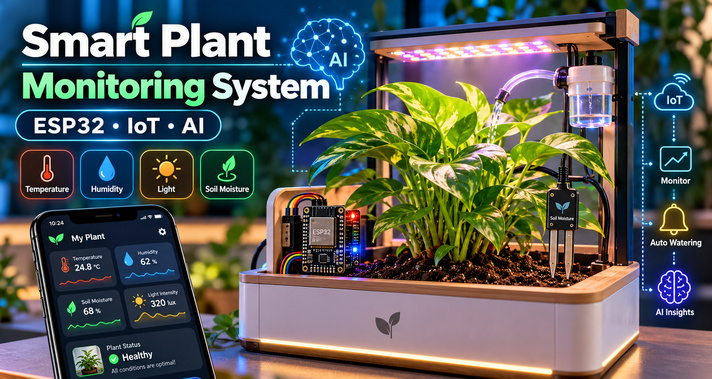
Taking care of indoor plants can sometimes be challenging, especially when you have a busy schedule. Forgetting to water plants, providing insufficient sunlight, or overlooking changes in temperature can affect their growth and overall health. But what if your plants could tell you when they need water or automatically receive the right amount of light?
With the help of the ESP32 microcontroller, IoT sensors, and artificial intelligence, you can build a smart plant monitoring system that makes plant care easier and more efficient. This system continuously monitors soil moisture, temperature, humidity, light intensity, and other environmental conditions. It can automatically water plants when the soil becomes dry, control lighting, and send real-time updates to your smartphone using the Blynk IoT platform.
In this tutorial, you will learn how to build your own smart plant box, connect the electronic components, configure automatic watering, create an IoT dashboard, and optionally integrate AI for smarter monitoring.
What Is a Smart Plant Monitoring System?
A smart plant monitoring system is an electronic device that uses sensors and a microcontroller to monitor the growing conditions of a plant. Instead of manually checking the soil or guessing when a plant needs water, the system collects environmental data and responds according to predefined conditions. The ESP32 acts as the brain of the system. It receives information from different sensors and processes it to determine whether the plant needs attention.
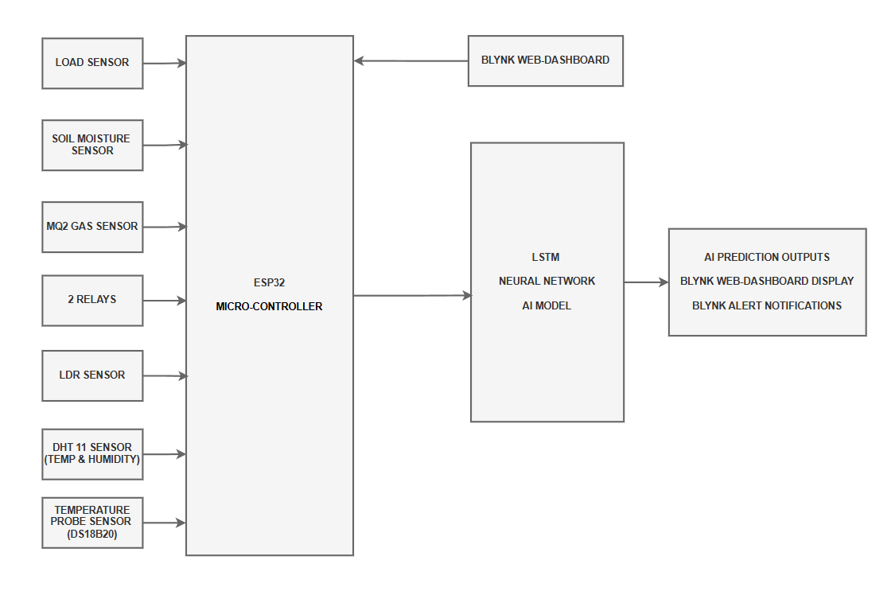
For example, when the soil moisture drops below a certain level, the ESP32 can activate a small water pump. Similarly, when the surrounding light becomes insufficient, the system can switch on an artificial light. By connecting the ESP32 to Wi-Fi, you can also monitor these conditions remotely through a mobile application. For more advanced applications, a machine learning model can analyze historical sensor readings and predict changes in environmental conditions.
How Does the Smart Plant Box Work?
The working principle is based on four main operations: sensing, processing, controlling, and monitoring. First, sensors installed around the plant continuously measure environmental conditions. These measurements are sent to the ESP32, which processes the information and compares it with suitable operating limits.
If the soil becomes too dry, the ESP32 activates a relay connected to the water pump. Once enough water has been supplied, the pump switches off. The same process can be used to control lighting according to the readings received from the light sensor.
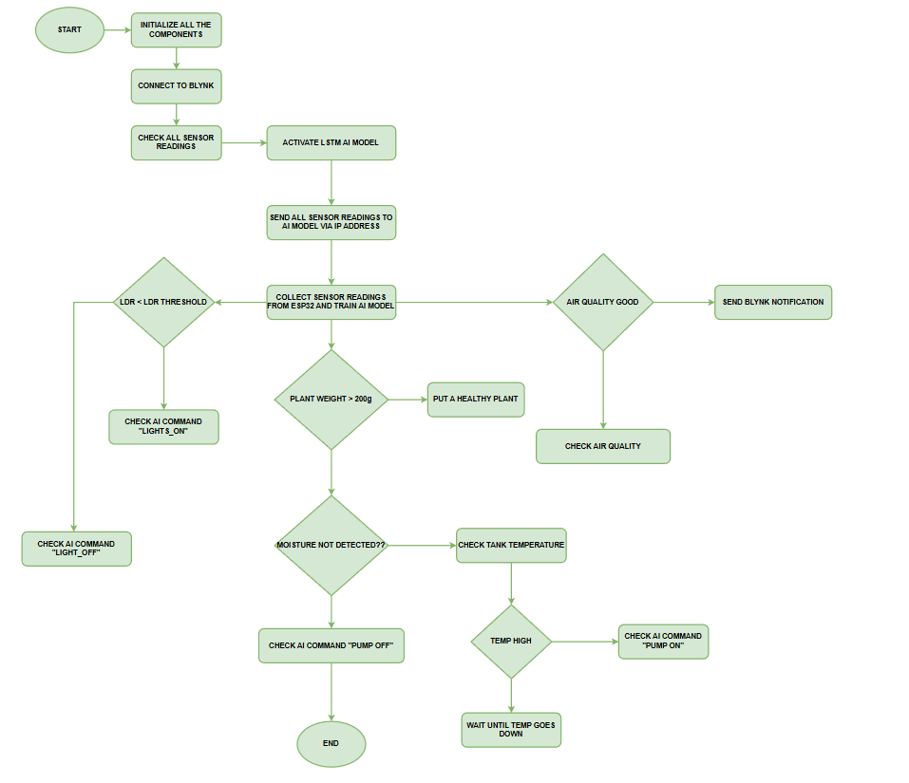
Meanwhile, the collected information is transmitted through Wi-Fi to the Blynk dashboard, allowing users to monitor the plant from a smartphone or computer. An optional AI model can further analyze the collected data and help predict future watering requirements.
Components Required for the Smart Plant Monitoring System
Before starting, gather the following electronic components.
| Component | Purpose |
|---|---|
| ESP32 development board | Main controller with built-in Wi-Fi |
| Soil moisture sensor | Measures soil moisture levels |
| DHT11 sensor | Measures air temperature and humidity |
| LDR sensor | Detects surrounding light intensity |
| MQ2 gas sensor | Detects changes in certain gases and smoke |
| DS18B20 temperature sensor | Measures soil or water temperature |
| Load cell with HX711 module | Measures plant pot weight |
| Two-channel relay module | Controls the water pump and light |
| Mini DC water pump | Supplies water to the plant |
| LED grow light | Provides additional lighting |
| Breadboard and jumper wires | Connect electronic components |
| Suitable DC power supplies | Power the controller and external devices |
| Water reservoir and tubing | Store and deliver water |
| Plant pot or enclosure | Holds the complete system |
Most of these components are commonly available from electronics stores and online marketplaces. For beginners, it is better to assemble the circuit on a breadboard before designing a permanent enclosure.
Step 1: Prepare the Smart Plant Box
Start by selecting a suitable container for the plant and electronic components.
- The plant pot should have enough space for the soil moisture sensor while allowing proper drainage.
- Place a small water reservoir beside or below the pot. Install the DC water pump inside the reservoir and connect a flexible tube from the pump outlet to the soil.
- Make sure the tube delivers water directly into the pot without spraying the electronic components.
- Next, choose a dry location for the ESP32, relay module, and wiring.
- A separate compartment is recommended to protect them from accidental water exposure.
- Install the LED grow light above the plant at a suitable distance according to the type of light being used.
- Once the physical structure is ready, you can begin connecting the sensors.
Step 2: Connect the Sensors to ESP32
Each sensor performs a specific monitoring task and must be connected to the appropriate ESP32 pins. For a common original ESP32 DevKit board, you can use the following example pin assignments.
| Sensor or device | ESP32 GPIO |
|---|---|
| Soil moisture sensor (analog) | GPIO 34 |
| LDR sensor (analog) | GPIO 35 |
| MQ2 sensor (analog) | GPIO 32 |
| DHT11 data pin | GPIO 4 |
| DS18B20 data pin | GPIO 5 |
| HX711 data pin | GPIO 18 |
| HX711 clock pin | GPIO 19 |
| Water pump relay | GPIO 25 |
| Lighting relay | GPIO 26 |
These are suggested GPIO connections. Pin availability and wiring requirements may vary depending on the ESP32 board and sensor modules. Connect the sensor power and ground pins according to their specifications. The DS18B20 generally requires a pull-up resistor on its data line.
Important: ESP32 GPIO pins are designed for 3.3V signals and must not receive 5V directly. Certain modules, particularly MQ2 sensor boards, may produce higher-voltage analog outputs. Use appropriate voltage division or level shifting where necessary.
Step 3: Install the Soil Moisture Sensor
The soil moisture sensor is one of the most important components because it determines when the plant needs watering. Insert the sensor into the soil near the plant roots, but avoid placing it directly under the water outlet. Connect its analog output to the ESP32 and read the values using the analogRead() function.
To calibrate the sensor, record its output under two conditions:
- When the soil is dry.
- When the soil is sufficiently moist.
These readings will help you determine a suitable watering threshold. For example, if your calibrated sensor indicates that the soil has become too dry, the ESP32 can activate the water pump.
Avoid using a universal moisture threshold because readings vary depending on the sensor, soil composition, and plant type. A capacitive moisture sensor is often a better long-term choice than an inexpensive exposed-electrode resistive sensor because it is generally less vulnerable to corrosion.
Step 4: Measure Temperature, Humidity, and Light
Temperature, humidity, and lighting also influence plant growth. The DHT11 sensor measures the surrounding temperature and relative humidity. Position it near the plant while keeping it away from direct water contact. The DS18B20 probe can be installed in the soil or water reservoir to monitor temperature in that location.
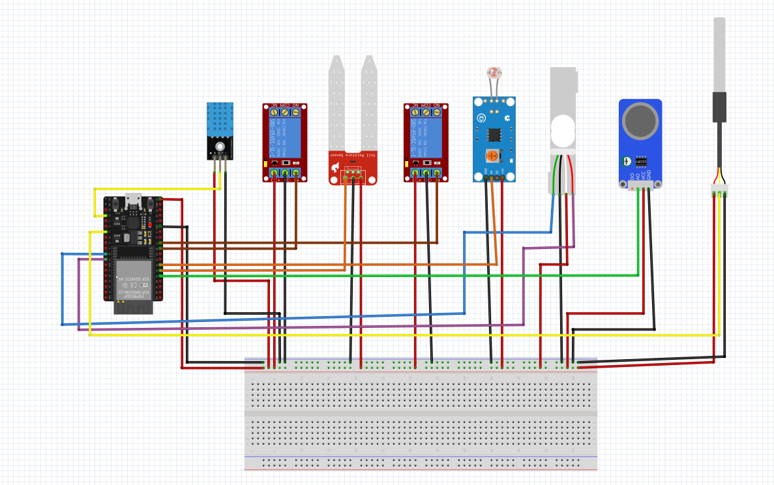
Next, install the LDR sensor where it can detect the light reaching the plant. The LDR changes its electrical resistance according to the surrounding light. With a suitable voltage-divider circuit or LDR module, the ESP32 can read this change and determine whether additional lighting is needed.
When the measured light level drops below a calibrated threshold, the ESP32 can activate the LED grow light through the relay module. For better plant care, combine light-based control with a daily lighting schedule. Plants also need an appropriate dark period, depending on their species.
Step 5: Add Air Monitoring and Plant Weight Measurement
You can enhance the project by including an MQ2 gas sensor and a load cell. The MQ2 sensor responds to certain combustible gases and smoke. It can be used to observe changes in the surrounding environment, although it should not be considered a complete air-quality monitor or a carbon dioxide sensor.
Allow the sensor to warm up and follow the manufacturer’s calibration instructions before interpreting its readings. For weight measurement, place a load cell beneath the plant pot and connect it to the ESP32 through an HX711 amplifier module. The HX711 converts the load cell’s signal into digital measurements that the ESP32 can process.
Calibrate the load cell using a known weight before placing the pot on it. Monitoring pot weight can help identify changes caused by watering, evaporation, or removal of the container. However, weight alone cannot reliably determine whether a plant is healthy.
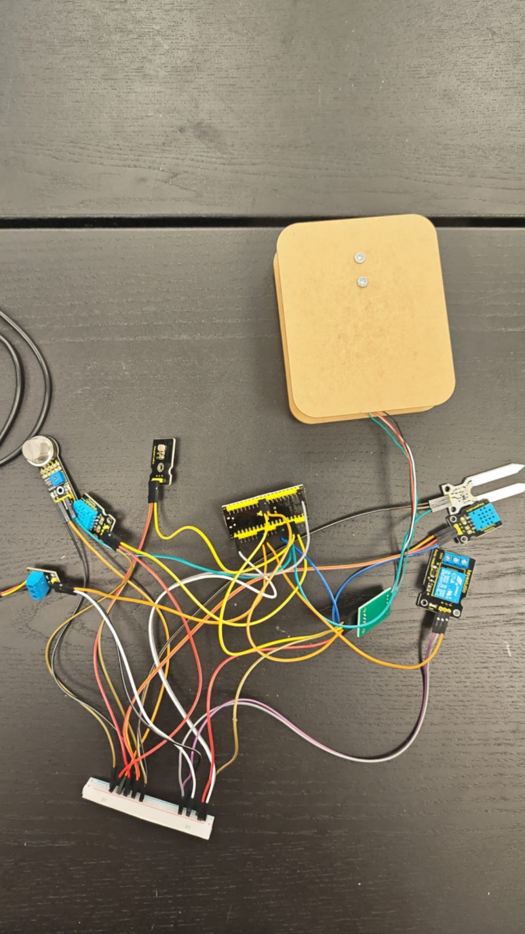
Step 6: Configure Automatic Watering
Now comes one of the most interesting parts of the project: making the plant water itself. Connect the DC water pump through the relay module using an appropriately rated external power supply. The ESP32 sends a control signal to the relay, which switches the pump’s power circuit.
The watering process should follow this sequence:
- Read the soil moisture sensor.
- Compare the value with the calibrated dry-soil threshold.
- Activate the pump if watering is necessary.
- Run the pump for a short, controlled interval.
- Switch the pump off and allow the water to soak into the soil.
- Measure the moisture again before deciding whether more water is needed.
You should also configure a maximum pump operating time to prevent overwatering if a sensor stops working. Keep the pump OFF when a moisture reading is missing or invalid. This approach can reduce unnecessary watering while maintaining more consistent soil conditions.
Step 7: Program ESP32 Using Arduino IDE
To control the complete system, you need to upload a program to the ESP32. Download and install Arduino IDE on your computer. Then add the ESP32 board package through the Boards Manager. Connect the ESP32 to your computer using a USB cable, select the correct board and COM port, and begin programming.
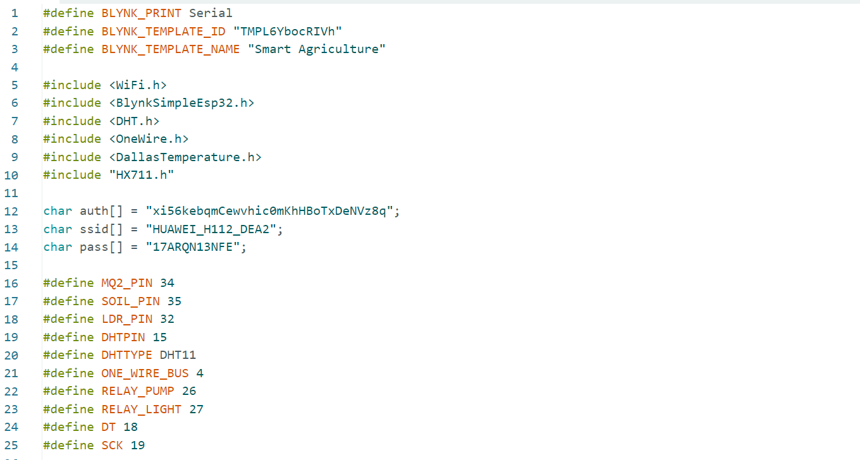
Install the libraries required by your selected sensors, including:
- DHT sensor library for temperature and humidity.
- OneWire and DallasTemperature for the DS18B20.
- HX711 library for load cell measurements.
- Blynk library for remote monitoring.
Your program should initialize the sensors, read their values, check the watering and lighting conditions, and update the connected dashboard. Start by displaying all measurements in the Arduino Serial Monitor. Once the readings are stable, add the relay control functions. Test the relay outputs individually before connecting the pump and grow light.
Step 8: Create a Blynk IoT Dashboard
Blynk is an IoT platform that allows you to monitor and control connected devices using a smartphone or web dashboard. To set it up, visit the Blynk website and create an account. Create a new device template for your ESP32 and configure the required data streams.
You can create dashboard widgets for:
- Temperature and humidity readings.
- Soil moisture percentage.
- Light intensity.
- Gas sensor readings.
- Plant pot weight.
- Water pump status.
- Grow light status.
You can also add manual ON/OFF switches for the pump and lighting system.
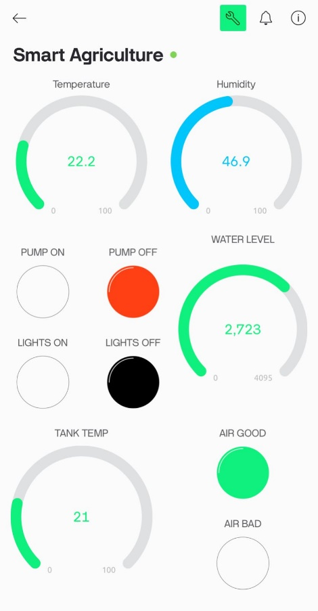
Use Blynk virtual pins to connect each dashboard widget with the corresponding value in your ESP32 program.
Add your Wi-Fi credentials and Blynk authentication details to the firmware, keeping private tokens secure.
Once everything is configured, the ESP32 can transmit new sensor readings to the dashboard at regular intervals.
You can now check plant conditions remotely and receive notifications when certain measurements move outside their configured limits.
Step 9: Integrate AI for Smarter Plant Monitoring
Basic automation works with predefined sensor thresholds, but artificial intelligence can make the project more advanced. One possible approach is to use a Long Short-Term Memory (LSTM) neural network. LSTM is a machine learning architecture designed to recognize patterns in sequential data. It can analyze sensor readings collected over time to help predict environmental changes.
For example, you could train a model to forecast how quickly the soil moisture is decreasing based on previous readings. To build this feature, collect sensor measurements with timestamps and store them in a dataset. Use Python with TensorFlow or Keras to prepare the dataset, train the LSTM model, and evaluate its predictions.
Because running a complex neural network directly on an ESP32 may be impractical, you can execute the model on a computer or server. The ESP32 sends sensor readings over Wi-Fi, and the Python application returns predictions or control recommendations. Only use those recommendations for automatic control after testing the model with previously unseen data. Keep pump safety limits active regardless of the AI output.
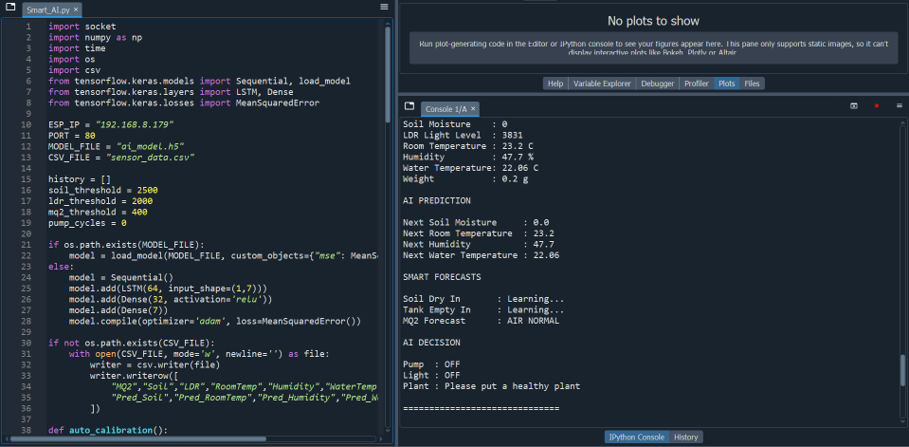
Step 10: Test the Complete System
After connecting the hardware and uploading the program, test the system under different conditions. First, check that all sensor readings appear correctly in the Serial Monitor and Blynk dashboard.
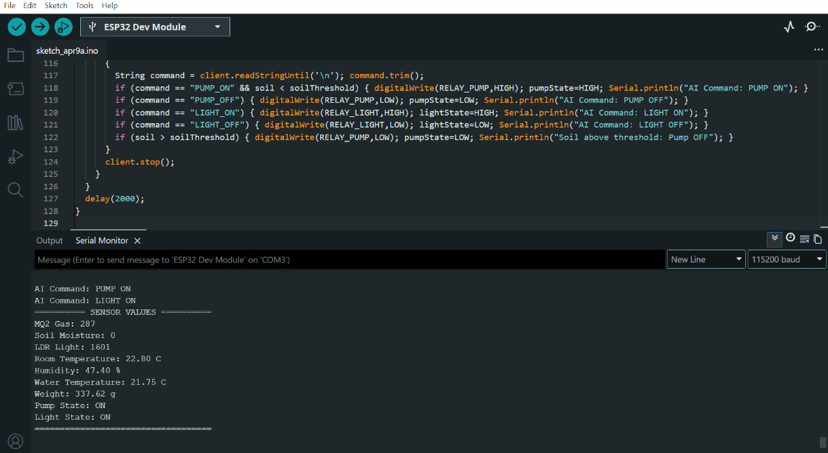
Next, allow the soil to become dry enough to trigger the watering condition. Confirm that the pump activates and stops after the configured interval. Add water to the soil and verify that the pump remains off once sufficient moisture is detected.
You should also cover the LDR sensor to simulate low lighting and check whether the grow light responds as expected. Finally, test the system after restarting the ESP32 and temporarily disconnecting Wi-Fi. Local watering safety controls should continue to operate even if the dashboard becomes unavailable, provided your firmware has been designed for offline operation.
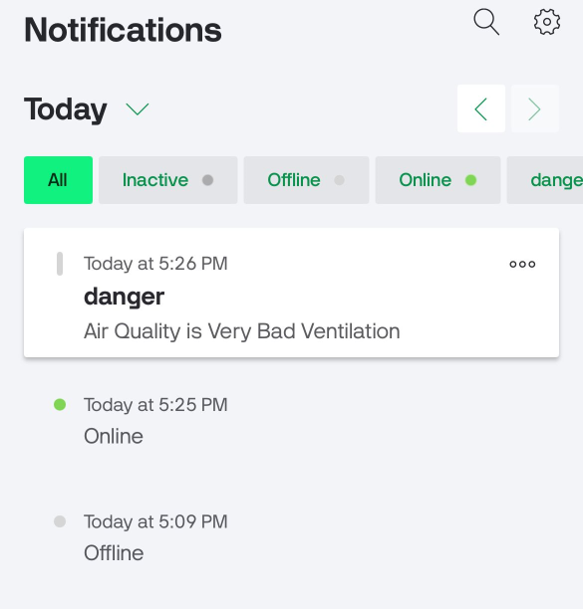
Never leave an automated water pump running unattended until its safety and failure conditions have been thoroughly tested.
Common Problems and Troubleshooting
Soil Moisture Sensor Gives Incorrect Readings
Check the sensor wiring and perform calibration using dry and moist soil. Keep the sensor at a consistent depth.
Water Pump Does Not Turn On
Verify the relay wiring, pump power supply, and ESP32 output settings. Some relay modules operate using active-low signals.
ESP32 Is Not Connecting to Wi-Fi
Check the network credentials and signal strength. Standard ESP32 boards generally connect to 2.4 GHz Wi-Fi networks.
Blynk Dashboard Does Not Update
Check the authentication information, datastream configuration, virtual pin assignments, and internet connection.
AI Predictions Are Inaccurate
Collect more representative sensor data, check for measurement errors, and evaluate the model against new readings before using its output for automated control.
Benefits of a Smart Plant Monitoring System
A smart plant box offers several practical advantages for home gardening and electronics education.
It reduces the need for frequent manual moisture checks and allows watering to respond to measured soil conditions.
Remote monitoring is particularly useful when you are away from home, while automatic lighting helps maintain a more consistent growing environment.
The system also provides hands-on experience with ESP32 programming, sensor calibration, electronic switching, wireless communication, IoT dashboards, and machine learning.
It can be expanded later with additional features such as reservoir-level detection, data logging, improved sensors, and support for multiple plants.
Frequently Asked Questions (FAQs)
1. Can beginners build a smart plant monitoring system?
Yes. Beginners with basic knowledge of Arduino programming and electronics can build a simple version using an ESP32, soil moisture sensor, relay, and water pump. Additional sensors and AI features can be added gradually.
2. Can ESP32 automatically water plants?
Yes. An ESP32 can read soil moisture values and activate a relay connected to a water pump whenever the soil becomes too dry. Correct calibration and pump safety limits are essential.
3. Does the smart plant monitoring system require internet access?
An internet connection is required for Blynk remote monitoring and cloud notifications. However, local sensor readings and automatic watering can operate without internet access if the ESP32 firmware is designed accordingly.
4. What is the role of artificial intelligence in smart plant monitoring?
Artificial intelligence can analyze historical sensor data to identify patterns and predict future environmental conditions. This may help improve watering decisions, but AI is not necessary for basic automation.
5. Which microcontroller is best for an IoT plant monitoring system?
ESP32 is a practical choice because it offers built-in Wi-Fi, multiple GPIO pins, analog inputs, and support for many commonly used sensors. It also works with Arduino IDE and popular IoT platforms.
6. Can I monitor multiple plants with one ESP32?
Yes. You can connect multiple moisture sensors to available input pins and use separate pumps or valves for individual plants. The required power supply, wiring, and control logic will depend on the number of plants.
7. How can I improve the accuracy of the system?
Calibrate sensors regularly, install them correctly, use reliable power supplies, and check readings under different conditions. Replacing low-quality sensors with more accurate alternatives can also improve reliability.
8. Can this system be used for outdoor gardening?
Yes, but outdoor installation requires weather-resistant enclosures, protected wiring, suitable power arrangements, and sensors that can tolerate outdoor conditions. A basic indoor prototype should not be exposed directly to rain or extreme heat.
Conclusion
Building a smart plant monitoring system using ESP32, IoT, and AI is an excellent way to combine electronics, programming, and modern automation in one practical project. By connecting different sensors to the ESP32, you can continuously monitor your plant’s environment and automatically control watering and lighting based on its needs.
The Blynk dashboard makes monitoring convenient, while optional AI integration introduces more advanced possibilities for analyzing environmental data.
Start with a simple working circuit, test each component carefully, and gradually add new features. With proper calibration and safe electrical connections, you can build a useful smart gardening system while developing valuable skills in IoT and embedded systems.
For more information, fee free to reach us through our Contact page.
Code
import socket
import numpy as np
import time
import os
import csv
from tensorflow.keras.models import Sequential, load_model
from tensorflow.keras.layers import LSTM, Dense
from tensorflow.keras.losses import MeanSquaredError

ESP_IP = "192.168.8.179"
PORT = 80
MODEL_FILE = "ai_model.h5"
CSV_FILE = "sensor_data.csv"

history = []
soil_threshold = 2500
ldr_threshold = 2000
mq2_threshold = 400
pump_cycles = 0

if os.path.exists(MODEL_FILE):
    model = load_model(MODEL_FILE, custom_objects={"mse": MeanSquaredError()})
else:
    model = Sequential()
    model.add(LSTM(64, input_shape=(1,7)))
    model.add(Dense(32, activation='relu'))
    model.add(Dense(7))
    model.compile(optimizer='adam', loss=MeanSquaredError())

if not os.path.exists(CSV_FILE):
    with open(CSV_FILE, mode='w', newline='') as file:
        writer = csv.writer(file)
        writer.writerow([
            "MQ2","Soil","LDR","RoomTemp","Humidity","WaterTemp","Weight",
            "Pred_Soil","Pred_RoomTemp","Pred_Humidity","Pred_WaterTemp"
        ])

def auto_calibration():
    global soil_threshold, ldr_threshold, mq2_threshold
    data = np.array(history)
    soil_threshold = int(np.mean(data[:,1]) + 200)
    ldr_threshold = int(np.mean(data[:,2]))
    mq2_threshold = int(np.mean(data[:,0]) + 100)

def predict_soil_dry_time():
    if len(history) < 10:
        return "Learning..."
    soil_vals = [x[1] for x in history[-10:]]
    trend = soil_vals[-1] - soil_vals[0]
    if trend <= 0:
        return "Stable"
    rate = trend / 10
    minutes = int((soil_threshold - soil_vals[-1]) / rate)
    if minutes < 0: minutes = 0
    return str(minutes) + " min"

def predict_tank_empty():
    global pump_cycles
    if pump_cycles < 3:
        return "Learning..."
    minutes = 30 - pump_cycles * 3
    if minutes < 5: return "CRITICAL"
    return str(minutes) + " min"

def predict_mq2(prediction):
    future_mq2 = prediction[0]
    if future_mq2 > mq2_threshold:
        return "BAD AIR WARNING"
    return "AIR NORMAL"

def save_to_csv(values, prediction):
    with open(CSV_FILE, mode='a', newline='') as file:
        writer = csv.writer(file)
        writer.writerow([
            values[0], values[1], values[2], values[3], values[4],
            values[5], values[6], prediction[1], prediction[3],
            prediction[4], prediction[5]
        ])

def display(values, prediction, pump, light, plant_msg):
    mq2, soil, ldr, tempRoom, humidity, waterTemp, weight = values
    soil_time = predict_soil_dry_time()
    tank_time = predict_tank_empty()
    mq2_status = predict_mq2(prediction)
    print("\n==============================")
    print("\nSENSOR VALUES\n")
    print("MQ2 Gas          :", int(mq2))
    print("Soil Moisture    :", int(soil))
    print("LDR Light Level  :", int(ldr))
    print("Room Temperature :", round(tempRoom,2), "C")
    print("Humidity         :", round(humidity,2), "%")
    print("Water Temperature:", round(waterTemp,2), "C")
    print("Weight           :", round(weight,2), "g")
    print("\nAI PREDICTION\n")
    print("Next Soil Moisture     :", round(prediction[1],2))
    print("Next Room Temperature  :", round(prediction[3],2))
    print("Next Humidity          :", round(prediction[4],2))
    print("Next Water Temperature :", round(prediction[5],2))
    print("\nSMART FORECASTS\n")
    print("Soil Dry In       :", soil_time)
    print("Tank Empty In     :", tank_time)
    print("MQ2 Forecast      :", mq2_status)
    print("\nAI DECISION\n")
    print("Pump  :", pump)
    print("Light :", light)
    print("Plant :", plant_msg)
    print("\n==============================")

def decide(values, prediction):
    global pump_cycles
    mq2, soil, ldr, tempRoom, humidity, waterTemp, weight = values
    pump_cmd, light_cmd = "PUMP_OFF", "LIGHT_OFF"
    pump_text, light_text = "OFF", "OFF"
    plant_message = "Plant OK"
    if weight < 200:
        plant_message = "Please put a healthy plant"
    if weight > 200:
        if soil < soil_threshold and waterTemp < 30:
            pump_cmd, pump_text = "PUMP_ON", "ON"
            pump_cycles += 1
        elif soil > soil_threshold or waterTemp >= 30:
            pump_cmd, pump_text = "PUMP_OFF", "OFF"
        if ldr < ldr_threshold:
            light_cmd, light_text = "LIGHT_ON", "ON"
    return pump_cmd, light_cmd, pump_text, light_text, plant_message

while True:
    try:
        s = socket.socket()
        s.connect((ESP_IP, PORT))
        data = s.recv(1024).decode().strip()
        values = list(map(float, data.split(",")))
        history.append(values)
        prediction = values
        if len(history) > 20:
            X = np.array(history[:-1]).reshape((-1,1,7))
            y = np.array(history[1:])
            model.fit(X, y, epochs=1, verbose=0)
            x_pred = np.array(values).reshape((1,1,7))
            prediction = model.predict(x_pred, verbose=0)[0]
        if len(history) % 50 == 0:
            auto_calibration()
            model.save(MODEL_FILE)
        pump_cmd, light_cmd, pump_text, light_text, plant_msg = decide(values, prediction)
        display(values, prediction, pump_text, light_text, plant_msg)
        save_to_csv(values, prediction)
        s.send((pump_cmd+"\n").encode())
        s.send((light_cmd+"\n").encode())
        s.close()
        time.sleep(2)
    except Exception as e:
        print("Connection Error:", e)
        time.sleep(2)